CSS3 文本效果
更新时间:2020-05-16 22:03CSS3中包含几个新的文本特征。在本章中您将了解以下文本属性:
text-shadow
text-overflow
word-wrap
word-break
浏览器支持
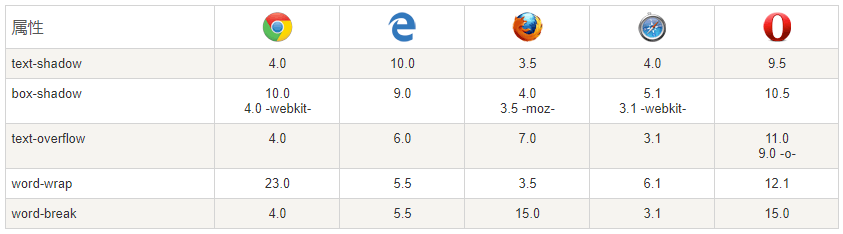
CSS3 的文本阴影
CSS3 中,text-shadow属性适用于文本阴影。
指定了水平阴影,垂直阴影,模糊的距离,以及阴影的颜色:
<!DOCTYPE html>
<html>
<head>
<meta charset="utf-8">
<title>95知识库(995w.com)</title>
<style>
h1
{
	text-shadow: 5px 5px 5px #FF0000;
}
</style>
</head>
<body>

<h1>Text-shadow effect!</h1>

<p><b>注意:</b> Internet Explorer 9 以及更早版本的浏览器不支持 text-shadow属性.</p>

</body>
</html>CSS3 Text Overflow属性
CSS3文本溢出属性指定应向用户如何显示溢出内容
<!DOCTYPE html>
<html>
<head>
<meta charset="utf-8">
<title>95知识库(995w.com)</title>
<style>
div.test
{
white-space:nowrap;
width:12em;
overflow:hidden;
border:1px solid #000000;
}
</style>
</head>
<body>
<p>以下 div 容器内的文本无法完全显示,可以看到它被裁剪了。</p>
<p>div 使用 "text-overflow:ellipsis":</p>
<div class="test" style="text-overflow:ellipsis;">This is some long text that will not fit in the box</div>
<p>div 使用 "text-overflow:clip":</p>
<div class="test" style="text-overflow:clip;">This is some long text that will not fit in the box</div>
<p>div 使用自定义字符串 "text-overflow: >>"(只在 Firefox 浏览器下有效):</p>
<div class="test" style="text-overflow:'>>';">This is some long text that will not fit in the box</div>
</body>
</html>CSS3的换行
如果某个单词太长,不适合在一个区域内,它扩展到外面:
CSS3中,自动换行属性允许您强制文本换行 - 即使这意味着分裂它中间的一个字:
<!DOCTYPE html>
<html>
<head>
<meta charset="utf-8">
<title>95知识库(995w.com)</title>
<style>
p.test1
{
	width:9em;
	border:1px solid #000000;
	word-break:keep-all;
}

p.test2
{
	width:9em;
	border:1px solid #000000;
	word-break:break-all;
}
</style>
</head>
<body>

<p class="test1"> This paragraph contains some text. This line will-break-at-hyphenates.</p>
<p class="test2"> This paragraph contains some text: The lines will break at any character.</p>

<p><b>注意:</b>  word-break 属性不兼容 Opera.</p>

</body>
</html>